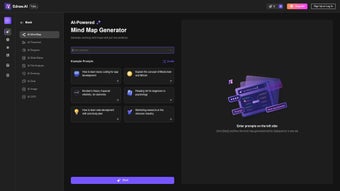

Download Edraw AI – AI‑powered diagramming, workflow automation, and data visualization tool
Overview of Eddraw AI
Edraw AI is a subscription‑based, web‑hosted application that blends the intuitive drag‑and‑drop experience of traditional diagramming software with the power of artificial intelligence. Designed for business analysts, project managers, data scientists, and anyone who needs to turn raw information into clear visual stories, Edraw AI automates data extraction, processing, pattern recognition, and predictive analytics. Its core mission is to streamline complex workflows, reduce manual effort, and deliver actionable insights faster than ever before.
By supporting a wide range of data formats—CSV, Excel, JSON, XML, and even direct database connections—the platform can ingest information from virtually any source, cleanse it using built‑in AI models, and then generate charts, flowcharts, mind maps, and process diagrams that update in real time as new data arrives. Because the tool lives in the cloud, teams can collaborate on the same canvas simultaneously, comment on changes, and version‑control diagrams without the need for cumbersome file‑sharing solutions. Whether you are building a marketing funnel, mapping a supply‑chain network, or visualizing machine‑learning outcomes, Eddraw AI promises a secure, scalable, and user‑friendly environment that grows smarter the more you use it.
In addition to the core visual capabilities, the platform offers an extensible API, allowing developers to embed diagramming widgets directly into internal portals or customer‑facing applications. This flexibility makes Eddraw AI not just a diagramming tool, but a foundational component of a data‑centric digital strategy.
Key Features and AI Capabilities
- AI‑driven Data Extraction: Automatically pull relevant fields from spreadsheets, PDFs, or API endpoints, reducing the time spent on manual copy‑pasting.
- Pattern Recognition Engine: Detect trends, outliers, and recurring structures within data sets, then suggest the most appropriate diagram type.
- Predictive Analytics Integration: Embed regression, classification, or clustering models directly into visualizations, with results updating as new data streams in.
- Multi‑format Support: Import and export in SVG, PNG, PDF, Visio (VSDX), and native Edraw AI formats for seamless interoperability.
- Real‑time Collaboration: Multi‑user editing, comments, and change tracking keep teams aligned without version conflicts.
- Smart Templates Library: Over 500 AI‑optimized templates for flowcharts, org charts, network diagrams, Gantt charts, and more.
- Adaptive Learning: The platform learns from user actions, suggesting layout refinements and data‑mapping shortcuts over time.
- Security & Compliance: End‑to‑end encryption, GDPR‑ready data handling, and role‑based access control protect sensitive business information.
- Automation Workflows: Build “if‑this‑then‑that” style pipelines that trigger diagram updates when source data changes.
- Cross‑Platform Accessibility: Accessible via any modern browser on Windows, macOS, Linux, Android, and iOS devices.
Why AI Makes a Difference
Traditional diagramming tools require users to manually select data, decide on chart types, and adjust layouts. Eddraw AI removes these friction points by applying machine‑learning models that understand the semantics of your data. For example, when you upload a sales ledger, the pattern‑recognition engine identifies time‑series trends and instantly proposes a line chart with predictive confidence bands.
The predictive analytics module can then overlay forecasted values, letting decision‑makers see future scenarios without leaving the canvas. This tight coupling of analytics and visualization eliminates the “hand‑off” between data‑science notebooks and presentation software, accelerating the insight‑to‑action loop. Moreover, the AI assistant continuously learns from each interaction, improving its suggestion accuracy and reducing the need for repetitive manual tweaks.
The result is a workflow where users spend less time cleaning data and more time interpreting insights, ultimately driving faster, data‑informed decisions across the organization.
Installation, Setup, and Everyday Usage
Getting Started – No Download Required
Because Eddraw AI is a cloud‑native service, there is no traditional installation process. Users simply navigate to edraw.ai, create an account, and choose a subscription tier that matches their team size and feature needs. The onboarding wizard walks you through:
- Connecting data sources – upload files, link cloud storage (Google Drive, OneDrive, Dropbox), or configure API endpoints.
- Selecting a template – choose from the Smart Templates Library based on the type of analysis you’re performing.
- Running the AI assistant – let the platform scan your data, suggest visualizations, and automatically populate shapes with live data bindings.
- Customizing layout – drag, resize, and style elements using the intuitive toolbar; the AI can auto‑align and balance the diagram if requested.
- Sharing and collaborating – generate a shareable link or invite team members via email, assigning viewer or editor roles.
Daily Workflow Tips
Once your first diagram is live, everyday usage becomes a blend of data management and visual storytelling. Here are some best practices:
- Refresh Data Regularly: Set up scheduled data pulls (hourly, daily, or weekly) so charts stay current without manual intervention.
- Leverage Version History: Use the built‑in timeline to revert to previous diagram states if a predictive model is retrained and produces unexpected results.
- Utilize Comment Threads: Stakeholders can leave context‑rich comments directly on shapes, ensuring discussions stay anchored to the visual element.
- Export for Offline Review: Export to PDF or PowerPoint for board meetings, while retaining live data links for later updates.
- Monitor AI Suggestions: Periodically review the AI’s recommended layout changes; you can accept, modify, or dismiss them based on domain knowledge.
- Integrate with Existing Toolchains: Use the RESTful API to push diagram snapshots into project‑management tools such as Jira or Confluence, keeping documentation synchronized.
- Maintain Security Hygiene: Rotate API keys regularly and enable multi‑factor authentication for all user accounts to protect sensitive data pipelines.
Compatibility, Pros & Cons, and Frequently Asked Questions
Operating System Compatibility
Eddraw AI runs entirely in a web browser, making it compatible with all major operating systems. Whether you’re on Windows 10/11, macOS Ventura, Linux distributions with a modern Chromium‑based browser, or mobile platforms such as Android 9+ and iOS 14+, you’ll experience the same feature set. The responsive UI adapts to tablet screens, allowing on‑the‑go diagram edits without sacrificing functionality. Because the service is hosted in the cloud, updates are rolled out instantly, ensuring every user benefits from the latest AI models and security patches without manual upgrades.
Pros and Cons
- Pros:
- AI automates data mapping, saving hours of manual work.
- Real‑time collaboration eliminates version‑control headaches.
- Broad data‑source support and secure cloud storage.
- Adaptive learning improves suggestions over time.
- Cross‑platform accessibility—no client install needed.
- Extensible API enables integration with existing enterprise ecosystems.
- Rich template library accelerates project kick‑offs.
- Cons:
- Subscription pricing may be higher for small teams compared to one‑time purchase diagram tools.
- Internet connectivity is required; offline mode is limited.
- Advanced AI features have a learning curve for non‑technical users.
- Customization beyond provided templates may require CSS/JS knowledge.
- Data‑intensive projects can incur additional cloud storage costs.
FAQ – Your Quick Reference Guide
Is there a free trial for Eddraw AI?
Yes, Eddraw AI offers a 14‑day free trial with full access to all premium features. No credit card is required to start the trial, allowing you to evaluate AI‑driven diagramming before committing.
Can I integrate Eddraw AI with existing BI tools like Power BI or Tableau?
Eddraw AI supports export of diagrams in SVG, PNG, and PDF, which can be embedded in Power BI or Tableau dashboards. Additionally, you can use the API to push diagram data directly into those platforms for dynamic visual updates.
How does Eddraw AI handle data security and privacy?
All data in transit and at rest is encrypted using TLS 1.3 and AES‑256 encryption. The platform complies with GDPR, CCPA, and ISO‑27001 standards, and offers role‑based access controls to restrict who can view or edit sensitive diagrams.
What subscription plans are available?
Eddraw AI provides three main tiers: Individual (single user, basic AI features), Team (5‑20 users, advanced analytics, priority support), and Enterprise (unlimited users, custom integrations, dedicated account manager). Prices start at $12/month for the Individual plan.
Can I use Eddraw AI offline?
A limited offline mode is available through the mobile app, which caches recent diagrams for viewing and minor edits. Full AI processing and data synchronization require an internet connection.
Conclusion & Call to Action
Eddraw AI stands out in the crowded diagramming market by embedding genuine artificial‑intelligence capabilities directly into the visual creation workflow. For businesses that need to turn complex data sets into clear, actionable visuals—whether for strategic planning, operational reporting, or stakeholder communication—the platform offers a compelling blend of automation, collaboration, and security. While the subscription model may be a consideration for very small teams, the time savings and predictive insights often outweigh the cost, especially when the tool replaces multiple legacy applications (data‑prep scripts, charting libraries, and static diagram editors). If you’re ready to modernize your workflow, accelerate decision‑making, and empower non‑technical users with AI‑enhanced visuals, click the button below to start your free trial and experience the future of diagramming today.
Start Your Free Trial of Eddraw AI
Pros: AI automation, real‑time collaboration, robust security, cross‑platform, API extensibility.
Cons: Subscription cost, limited offline capabilities, initial learning curve for advanced AI features.



.png)



